
AceKit - One-click integration of AceData AI capabilities for coding agents
You may have encountered this situation: while using Claude Code, Cursor, or Codex, you are writing code smoothly, and suddenly you need an image, a piece of background music, a short video, or you want it to conveniently look up the latest information. The result is that the agent itself cannot do these things. You have to find the API, read the documentation, configure the key, write the calling code, handle asynchronous polling, and after all that hassle, your inspiration has long cooled down.
AceKit is designed to solve this problem. It packages dozens of AI capabilities from the AceData Cloud platform—image generation, video generation, music generation, web search, etc.—into a toolkit that can be directly called by coding agents. After installing with a single command, you can simply speak in plain language in the agent's dialogue box, and it will automatically call the corresponding API to get the job done.
¶ One command, and the agent learns
Installation only requires the command npx acekit, which will automatically detect the coding agents on your machine (Claude Code, Cursor, Codex, Gemini CLI, etc.) and install the entire set of skills. After installation, you can just speak in plain language:
"Generate a cover image for this README"            → Image generation (Midjourney / Flux / Seedream / NanoBanana)
"Turn this script into a 30-second short video"     → Video generation (Sora / Veo / Kling / Seedance)
"Add a piece of background music to this demo"       → Music generation (Suno)
"Look up the latest X and summarize it"              → Web search (Google SERP)
¶ Three steps to get started
The entire process can be completed in a few minutes.
Step 1: Get an API Token. Go to the Ace Data Cloud console and copy your API Token—this single token is used to call all capabilities.
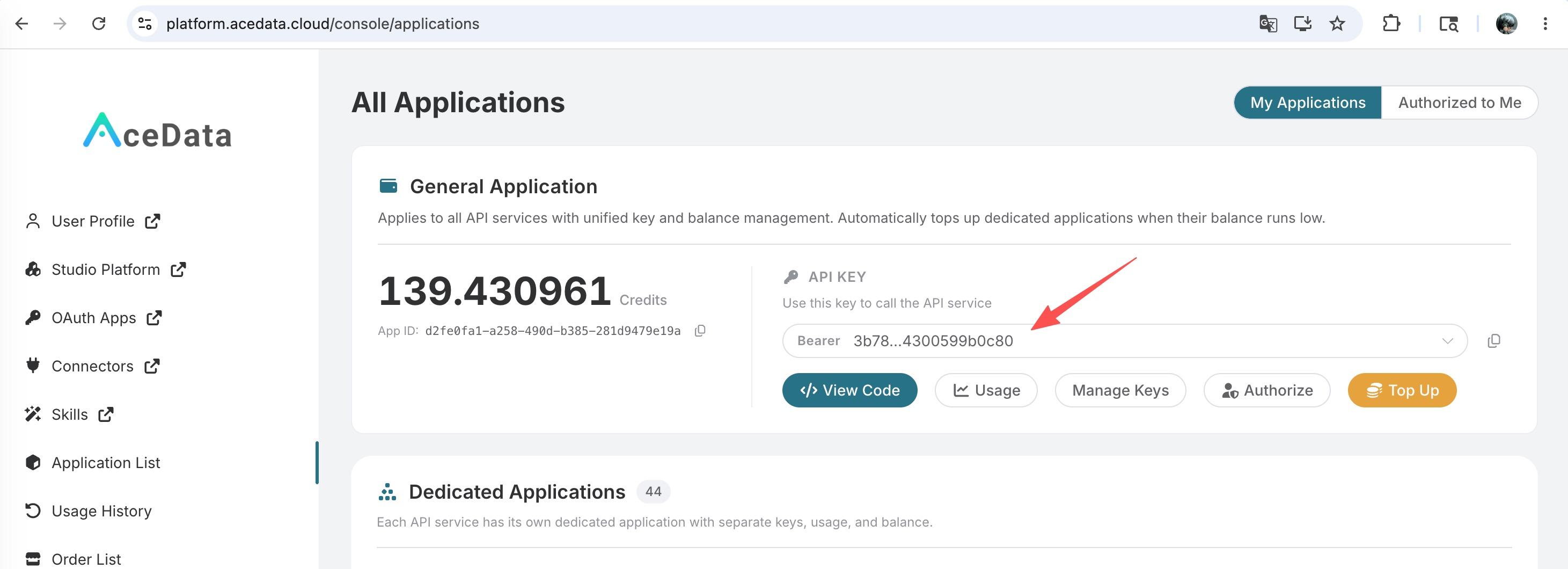
If you are not logged in, you will be automatically redirected to the login page. After logging in, return to this page; the first application will grant a free quota, so you can try it for free. Once obtained, set it in the environment variable (if not set, the first run will also prompt you to paste it interactively):
export ACEDATACLOUD_API_TOKEN=your_copied_token
Step 2: Install. Make sure you have Node.js (18+) installed, then:
npx acekit
When you see Installed 42 skills to ~/.claude/skills, you are done. Just restart/reload your agent.
Step 3: Speak in plain language. For example, to shorten a URL—you just say:
Use the short-url skill to shorten https://platform.acedata.cloud/services
The agent will load the skill by itself, initiate the call, and give you the result https://surl.id/1uNdzWrgLp (real and clickable). It's that simple.
¶ What exactly is installed
AceKit is the "front door" of the entire AceData developer toolset. With one installation, there is a whole set of things behind it:
- 42 Agent Skills: Each skill comes with a written
SKILL.mdoperation manual, telling the agent how to correctly call the corresponding API—details like authentication, asynchronous polling, and error retries are all documented, and the agent just needs to follow them. - MCP Server: Suno, Midjourney, Flux, Seedream, NanoBanana, Sora, Veo, Kling, Hailuo, SERP… have been published to PyPI, MCP Registry, VS Code, JetBrains, Smithery, Docker.
- Unified Token: One
ACEDATACLOUD_API_TOKENunlocks all capabilities, billed based on actual usage.
Supported capabilities:
| Type | Provider |
|---|---|
| 🖼️ Image Generation | Midjourney · Flux · Seedream · NanoBanana · OpenAI Image · QR Art |
| 🎬 Video Generation | Sora · Veo · Kling · Luma · Hailuo · Pixverse · Seedance · Wan |
| 🎵 Music Generation | Suno |
| 🔎 Search | Google SERP (web · images · news · maps · videos) |
| 🔗 Tools | Short links, face processing, document conversion, etc. |
¶ Supported Agents
| Agent | Skill Installation Location |
|---|---|
| Claude Code | ~/.claude/skills |
| Codex CLI | ~/.agents/skills |
| Cursor / Gemini / OpenCode, etc. | ~/.agents/skills (point your agent here) |
¶ Not a PPT, but something that really works
The best way to evaluate a tool is to run it once. We specifically set up a clean container (with nothing installed except Node), installed the real Claude Code and AceKit, and let it independently call the skills just installed. Besides the short link, it also completed more challenging asynchronous generation tasks on its own.
Image Generation (NanoBanana): The agent loaded the skill by itself, submitted the task, and polled until completion, obtaining the finished image (HTTP 200 · image/png · 2.4 MB)——
Music Generation (Suno): Similarly, the agent submitted, polled, and obtained a complete song (HTTP 200 · audio/mp3 · 3.6 MB): 🎵 Click to listen
From short links, image generation to music generation, all three real tasks from easy to difficult were completed independently by the agent. Your coding agent is no longer just capable of writing code; it now has the ability to generate images, videos, and music.
¶ Easter egg: Use the same Token to drive Claude Code itself
The AceData API is also compatible with the Anthropic /v1/messages format, so you do not need an official subscription from Anthropic; you can drive Claude Code with the same AceData Token. Create a .claude/settings.local.json in the project root directory:
{
  "env": {
    "ANTHROPIC_AUTH_TOKEN": "your_token",
    "ANTHROPIC_BASE_URL": "https://api.acedata.cloud"
  }
}
Restart Claude Code, and it will utilize the entire Claude model series while gaining the ability to generate images, videos, and music through AceKit. For more details, see the Claude Code Integration Guide.
¶ Start for free
AceKit is open source (MIT), and the repository is at github.com/AceDataCloud/AceKit. If you find it useful, please give it a ⭐.
- 🔑 Free API Key & Documentation: https://platform.acedata.cloud
- 💬 Discord: https://discord.gg/f9GRuKCmRc
- 🐦 X: @acedatacloud
- 📧 Email: office@acedata.cloud