

Using 知数云 in AnythingLLM
AnythingLLM is an open-source client positioned as “documents → private ChatGPT,” with the core concept being Workspace—each Workspace is a set of documents, a set of users, and a set of Agent tools, independently isolated. It is designed specifically for document conversations and provides both a desktop App and Docker form. In LLM Provider, it includes OpenAI (Generic), which allows filling in a custom Base URL, so the conversational model can be directly pointed to 知数云. This article introduces the configuration process.
¶ Application Process
To connect 知数云 in AnythingLLM, first go to the 知数云 Console, obtain your API Token, and keep it for later use.

If you have not logged in or registered yet, you will be automatically redirected to the login page and invited to register and log in. After logging in or registering, you will automatically return to the current page.
When applying for the first time, free credits will be provided, allowing you to experience 知数云's model services for free.
¶ Download AnythingLLM
For personal use, you can download the desktop version. The vector database (LanceDB) runs locally, document searching is completely offline, and the network is used only when calling models; for team multi-user scenarios, use Docker deployment.
¶ Configure the Conversational Model
Start AnythingLLM, go to Settings → LLM Preference, and select OpenAI (Generic) as the Provider (do not select regular OpenAI, which is fixed to api.openai.com and has no custom Base URL). For official documentation, see OpenAI (Generic) LLM Provider.
| Field | Value | Description |
|---|---|---|
| Base URL | https://xapi.zhishuyun.com/v1 |
Must end with /v1 |
| API Key | Your 知数云 Token | The Token copied from the console |
| Selected Model | Current model ID | Prioritize the list automatically loaded from /models; if not returned, query as described above and fill it in manually |
| Model context window | Fill in according to the selected model | Read the context limit from the current model directory; do not copy values from other models |
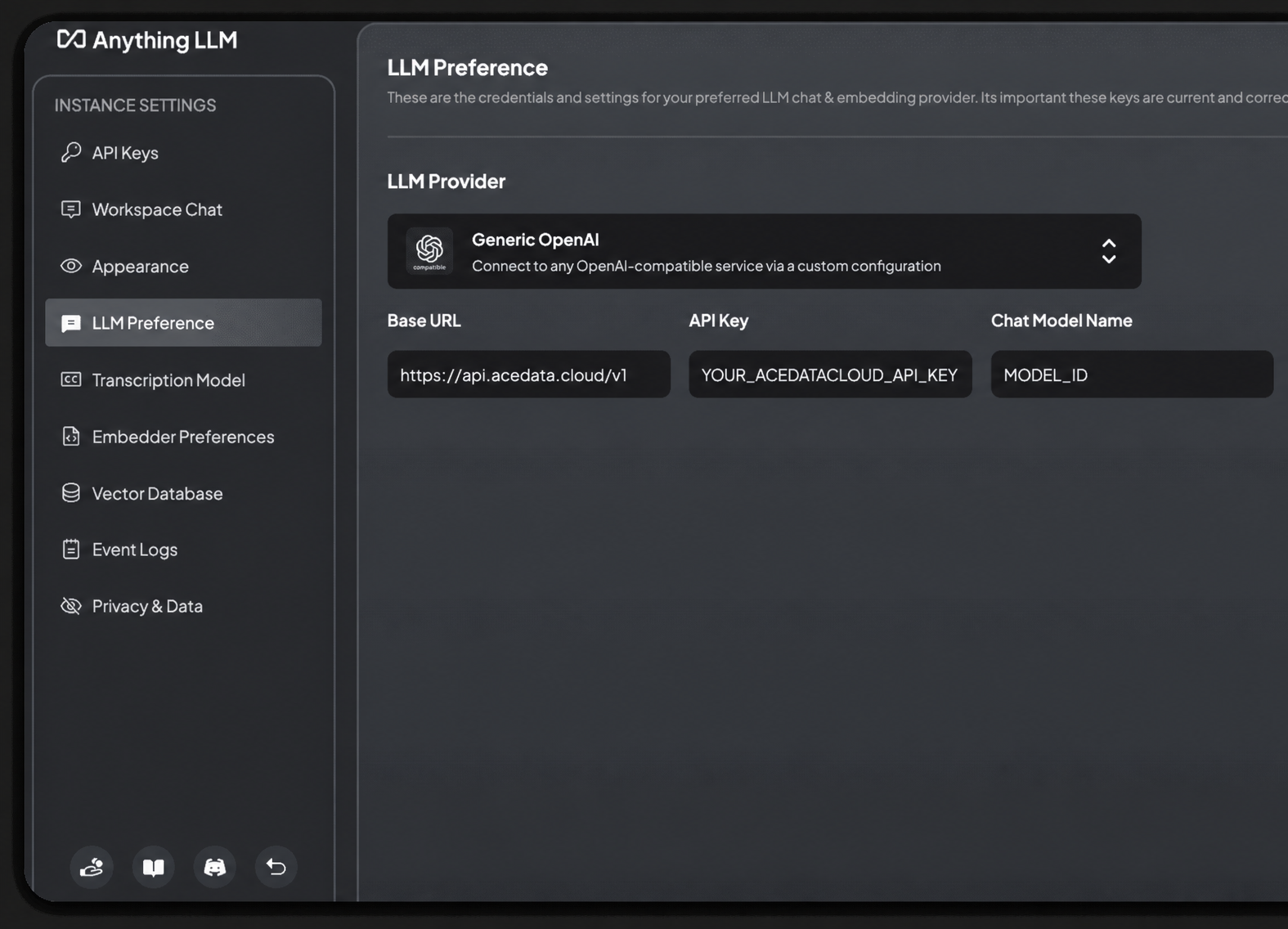
Model capabilities and context limits are subject to the current model directory.
Note the Base URL path rules:
| Base URL | Actual Request | Result |
|---|---|---|
https://xapi.zhishuyun.com/v1 |
https://xapi.zhishuyun.com/v1/chat/completions |
Correct |
https://xapi.zhishuyun.com/openai |
https://xapi.zhishuyun.com/openai/chat/completions |
Also usable |
https://xapi.zhishuyun.com/openai/v1 |
https://xapi.zhishuyun.com/openai/v1/chat/completions |
404 (there is no /v1 under /openai) |
https://xapi.zhishuyun.com |
https://xapi.zhishuyun.com/chat/completions |
404 (missing /v1) |
¶ Configure the Embedding Model
The core of AnythingLLM is RAG, which requires an embedding model to vectorize documents. Its Embedding Preference and LLM Preference are two independent sets of configurations—see Embedder Configuration Overview. Its built-in AnythingLLM Embedder (Built-in / Native) runs directly locally, works out of the box with zero configuration, and is the default and recommended choice:
Go to Settings → Embedding Preference, keep the Provider as the default AnythingLLM Embedder, and no key needs to be filled in. It completes document vectorization locally, with both the original text and vectors stored in the local LanceDB and not uploaded to the cloud.
AnythingLLM's Embedder options (cloud: OpenAI / Azure OpenAI / Cohere; local: Built-in, LM Studio, LocalAI, Ollama) are all integrated according to their respective fixed forms. Among them, cloud OpenAI embeddings are fixed to
api.openai.comand do not support a custom Base URL; if you want to use a custom endpoint, you can use the Generic OpenAI Embedder (which also has a Base URL field and can point to 知数云'stext-embedding-3-large) or the local LocalAI Embedder. In this article, the conversational model uses 知数云, while embeddings use AnythingLLM's built-in local Embedder, and the two do not affect each other.
¶ Select a Model
The model directory will continue to be updated. Prioritize the model list automatically loaded by the client; when manual entry is needed, first request GET https://xapi.zhishuyun.com/v1/models to obtain the current model ID, then select according to the context, image, and tool-calling capabilities supported by the client.
¶ Verify the Integration
If you are unsure whether the issue is with AnythingLLM or the network, you can first use curl to directly verify the endpoint (replace {token} with your Token):
curl -X POST 'https://xapi.zhishuyun.com/v1/chat/completions' \
  -H 'Authorization: Bearer {token}' \
  -H 'Content-Type: application/json' \
  -d '{
    "model": "MODEL_ID",
    "messages": [{"role": "user", "content": "ping"}]
  }'
Returning an OpenAI-compatible chat.completion object indicates that both the Token and endpoint are ready; if HTTP 403 used_up is returned, it means the Token is valid but the balance is insufficient, and you can top up in the console.
¶ Advanced: Workspace and Document Conversations
After creating a new Workspace, upload documents such as PDF / Word / Markdown. AnythingLLM will split them by paragraphs, use the local Embedder to generate vectors, and store them in the local LanceDB. During a conversation, it will first retrieve relevant segments, then pass the segments together with your question to the conversational model (that is, 知数云) for an answer, and cite the source below the answer. At the top of each Workspace, you can switch between Query mode (answers based only on documents) and Chat mode (mixes general knowledge); for serious scenarios, it is recommended to use Query mode to avoid hallucinations. During Docker deployment, environment variables such as GENERIC_OPEN_AI_BASE_PATH, GENERIC_OPEN_AI_API_KEY, and GENERIC_OPEN_AI_MODEL_PREF can be used to preset the same conversational model integration and enable multi-user mode.
¶ Frequently Asked Questions
¶ Prompt 404 / connection fail
Usually, the Base URL was written as .../openai/v1 or /v1 was omitted. Change it to https://xapi.zhishuyun.com/v1.
¶ Unable to converse after uploading documents
Please confirm that an available Embedder is selected in Settings → Embedding Preference (the default AnythingLLM Embedder can run locally and requires no additional configuration), and re-upload the documents to generate vectors.
¶ Prompt 401 Unauthorized
Please confirm that the API Key contains the 知数云 Token (without the Bearer prefix and without extra spaces), and that the corresponding application's balance is sufficient.
¶ Will local documents be uploaded to the cloud
No. The original documents are stored locally in LanceDB; only retrieved excerpts and your questions will be sent to the model.