

Using 知数云 in Open WebUI
Open WebUI (formerly Ollama WebUI) is an open-source AI client that supports multi-user access, knowledge bases, RAG, and private deployment. It supports custom OpenAI-compatible endpoints, so it can connect to 知数云. This article introduces the configuration process.
¶ Application Process
To connect 知数云 in Open WebUI, first go to the 知数云 Console, obtain your API Token, and keep it for later use.

If you have not logged in or registered yet, you will be automatically redirected to the login page to register and log in. After logging in or registering, you will automatically return to the current page.
When applying for the first time, free credits will be provided, allowing you to experience 知数云's model services for free.
¶ Deploy and Configure 知数云
Open WebUI connects to OpenAI-compatible endpoints through environment variables. You can deploy it with a single Docker command (replace {token} with your Token):
docker run -d \
  --name open-webui \
  -p 3000:8080 \
  -e WEBUI_SECRET_KEY=$(openssl rand -base64 32) \
  -e OPENAI_API_BASE_URL=https://xapi.zhishuyun.com/v1 \
  -e OPENAI_API_KEY={token} \
  -v open-webui:/app/backend/data \
  ghcr.io/open-webui/open-webui:main
| Environment Variable | Purpose |
|---|---|
OPENAI_API_BASE_URL |
知数云 endpoint, must end with /v1 |
OPENAI_API_KEY |
Your Token |
WEBUI_SECRET_KEY |
Session encryption key, generated automatically |
-v open-webui:/app/backend/data |
Persist conversations / user data |
Open http://your-server-IP:3000; the first registered account automatically becomes the administrator. Note the Base URL path rules:
| OPENAI_API_BASE_URL | Actual Request | Result |
|---|---|---|
https://xapi.zhishuyun.com/v1 |
https://xapi.zhishuyun.com/v1/chat/completions |
Correct |
https://xapi.zhishuyun.com/openai |
https://xapi.zhishuyun.com/openai/chat/completions |
Also available |
https://xapi.zhishuyun.com/openai/v1 |
https://xapi.zhishuyun.com/openai/v1/chat/completions |
404 (there is no /v1 under /openai) |
After logging in, go to Admin Panel → Settings → Connections and click "Verify Connection" to verify; in Settings → Models, you can filter and Pin frequently used models.
In addition to using environment variables, Open WebUI also supports adding connections directly in the interface: go to Admin Settings → Connections, click ➕ and enter the URL (
https://xapi.zhishuyun.com/v1) and API Key. Open WebUI will automatically call/modelsto retrieve the model list. See the official documentation Starting With OpenAI-Compatible Servers for details.
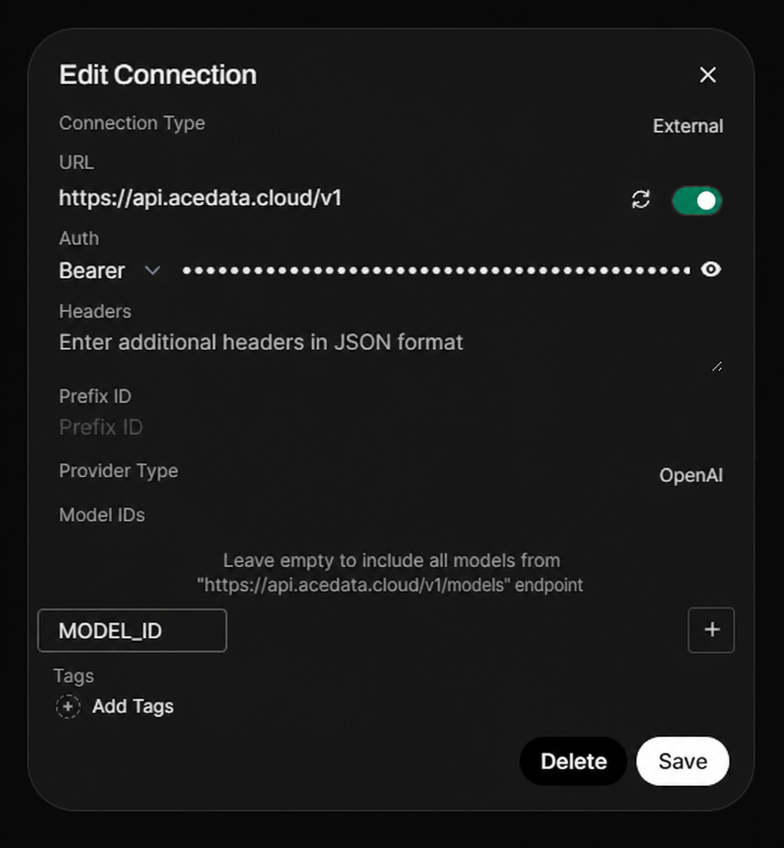
MODEL_IDis only used to demonstrate an optional allow list; when left blank, all models returned by/modelswill be displayed.
¶ Select a Model
The model catalog will continue to be updated. Prioritize using the model list automatically loaded by the client; when manual entry is required, first request GET https://xapi.zhishuyun.com/v1/models to obtain the current model IDs, then select according to the context, image, and tool-calling capabilities supported by the client.
¶ Verify the Integration
If you are unsure whether the issue is with Open WebUI or the network, you can first use curl to directly verify the endpoint (replace {token} with your Token):
curl -X POST 'https://xapi.zhishuyun.com/v1/chat/completions' \
  -H 'Authorization: Bearer {token}' \
  -H 'Content-Type: application/json' \
  -d '{
    "model": "MODEL_ID",
    "messages": [{"role": "user", "content": "ping"}]
  }'
Returning an OpenAI-compatible chat.completion object indicates that both the Token and endpoint are ready; if HTTP 403 used_up is returned, it means the Token is valid but the balance is insufficient. You can recharge in the Console.
¶ Advanced: Knowledge Base and Multi-User Access
Open WebUI's knowledge base (RAG) uses ChromaDB to store vectors by default. The embedding model can be specified as text-embedding-3-large (through 知数云). The original document text exists only on your server, and only matched segments will be sent to the model. In Admin Panel → Users, you can manage user roles (Pending / User / Admin); it is recommended to set "Default User Role" to pending, so new users must be reviewed before use, preventing outsiders from registering freely and consuming credits. If using an nginx reverse proxy, please add proxy_buffering off; and client_max_body_size 100M;.
¶ Frequently Asked Questions
¶ Connection error / 404 is displayed
Usually, OPENAI_API_BASE_URL was written as .../openai/v1 or is missing /v1. Change it to https://xapi.zhishuyun.com/v1.
¶ Unable to chat after uploading documents
In the RAG settings of the Admin Panel, select text-embedding-3-large (OpenAI provider) as the embedding model.
¶ Data is lost after the container restarts
You need to mount the data volume -v open-webui:/app/backend/data when starting.